Top Up Steam with Solana (SOL)
Lightning-fast method if you value every second. Solana (SOL) network transfers confirm in fractions of a second. Open Phantom Wallet and pay for games instantly.
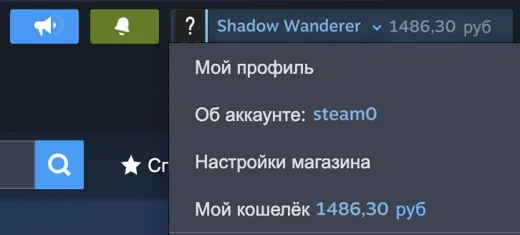
In the Steam client, click your profile name in the top-right corner. Your login is shown in the account line.
Delivered in parts:
Steam accepts up to $500 per payment and about $1,500 per day per account, so larger amounts arrive on a schedule. Times are approximate; an existing order on this login shifts them.
The network or exchange withdrawal fee is paid separately when you send. Steam credits the equivalent in your wallet currency.
- Refund in crypto if Steam rejects the payment
- Support 24/7 on Telegram
Your orders on this device
- Price: —
- Markup — 0%
- Speed — < 1 sec
- No KYC
- Fee — < $0.01
- 20+ cryptos
- Markup
- 0%
- Average time
- 1-5 min
Solana Crypto Payments: Ecosystem of the Future
Solana was originally designed as the most massive and fast network, capable of processing 65,000 transactions per second. This means you no longer have to sit and refresh the Steam page for hours during payment.
Paying with Phantom Wallet is so fast that the payment sometimes arrives before you can switch tabs. Plus, you get funds at cost thanks to Steam0's 0% markup.
Guide: Payment via Phantom
- 1
Enter your Steam login
Enter your exact Steam login in the form above.
- 2
Click the pay button
Choose the amount in USD and click "Pay with Solana". Our gateway will automatically convert the request at the live SOL rate.
- 3
Scan QR code with wallet
Open your mobile Phantom Wallet (or any other app) and scan the QR code, or simply copy the exact address and amount.
- ✓
Instant result
Funds will be credited to your Steam balance at the speed of light.
Top Up Steam with SOL
0% markup. Instant transactions. No verification.